---
title: "6. Gameplay"
url: "https://books.playgoventure.com/2/gvenig/23/6-gameplay"
---

# 6. Gameplay

<hr style="margin: 0;">
## 6.1 Basic and Advanced Versions

* GoVenture Entrepreneur is available in two versions:  BASIC and ADVANCED.
    
* The BASIC version has a lower price and includes the _Lemonade Stand_ and _Kiosk Business_ but does not include the _Full Business_.
    
* All included resources are the same in both versions.

<hr style="margin: 0;">
## 6.2 Video Demos

<iframe src="https://player.vimeo.com/video/610951967" style="border: none; display: block; margin: auto; aspect-ratio:16/9; height:auto; width:70%;" allow="autoplay; fullscreen; picture-in-picture"></iframe>

<div align="center">
<b>Lemonade Stand</b> | 
<a href="https://player.vimeo.com/video/610951967" target="_blank"_><u>Watch Full Screen</u></a>
</div>
<br>
   
<iframe src="https://player.vimeo.com/video/610952094" style="border: none; display: block; margin: auto; aspect-ratio:16/9; height:auto; width:70%;" allow="autoplay; fullscreen; picture-in-picture"></iframe>

<div align="center">
<b>Kiosk Business</b> |
<a href="https://player.vimeo.com/video/610952094" target="_blank"_><u>Watch Full Screen</u></a>
</div>
<br>
<iframe src="https://player.vimeo.com/video/510041667" style="border: none; display: block; margin: auto; aspect-ratio:16/9; height:auto; width:70%;" allow="autoplay; fullscreen; picture-in-picture"></iframe>

<div align="center">
<b>Full Business</b> |
<a href="https://player.vimeo.com/video/510041667" target="_blank"_><u>Watch Full Screen</u></a>
</div>

<br>
<hr style="margin: 0;">
## 6.3 Types of Businesses & Products

Students are able to choose from a number of business types listed below.  Instructors can restrict students to specific business types using Group settings.

### 1️⃣ Lemonade Stand

Starts with one Lemonade Stand and after achieving levels of profitability can open a second and third location.
    

### 2️⃣ Kiosk
7 types of products can be sold. All types provide a similar experience. Starts with one Kiosk and after achieving levels of profitability can start a second location and third is a Mobile Kiosk (or Food Truck).  
<details>
<summary><b>Expand to see list</b> — click the black triangle
</summary>
<ul>
<li>Ice Cream
<li>Tacos
<li>Hot Dogs
<li>Popcorn & Snacks
<li>Clothing
<li>Costume Jewelry
<li>Electronics
</ul>
</details>
<br>

### 3️⃣ Full Business

20 business types are available, categorized by easy, moderate, and difficult.  
<details>
<summary><b>Expand to see list</b> — click the black triangle
</summary>

<table>
    <tr>
        <th colspan="2">Business Type and Level</th>
        <th>Description</th>
        <th>Sell</th>
        <th>Unique Features</th>
    </tr>
    <tr>
        <td colspan="2"><b>Ice-Cream Parlor</b><br> <span style="color:green"><b>Easy</b></span></td>
        <td>Quick service restaurant that sells ice-cream sundaes, cones, and bars. Similar to Baskin Robbins, Ben & Jerry’s, Dairy Queen, and others.</td>
        <td>3 Products<br>5 Inventory Items</td>
        <td>Similar to Kiosk business with only a few products but with the advanced features of Full Business. This is a good practice or entry-level Simulation.</td>
    </tr>
    <tr>
        <td colspan="2"><b>Department Store</b> <span style="color:Purple"><b>Moderate</b></span></td>
        <td>Retail store that sells clothing, jewelry, housewares, toys, electronics, sporting goods, and more. Similar to Walmart, Target, and others.</td>
        <td>31 Products (identical Inventory Items)</td>
        <td>Retail businesses have many products but they do not require any type of assembly or combination of inventory items and they do not degrade in quality over time. This makes inventory management important but easier than food businesses.</td>
    </tr>
    <tr>
        <td colspan="2"><b>Cosmetics Boutique</b> <span style="color:Purple"><b>Moderate</b></span></td>
        <td>Retail store that sells makeup, personal-care products, and more.<br>Similar to L'Oréal, Clinique, and others.</td>
        <td>31 Products (identical Inventory Items)</td>
        <td>Retail businesses have many products but they do not require any type of assembly or combination of inventory items and they do not degrade in quality over time. This makes inventory management important but easier than food businesses.</td>
    </tr>
    <tr>
        <td colspan="2"><b>Fitness Gym</b> <span style="color:Purple"><b>Moderate</b></span></td>
        <td>Fitness gym that offers membership services for fitness classes and equipment. Customers pay a membership fee and may also purchase products. Similar to Planet Fitness, LA Fitness, and others.</td>
        <td>4 Fitness Classes (services), 5 Fitness Equipment (services), 3 Products (same Inventory Items)</td>
        <td>Membership-based pricing for all services. Some services require the business to purchase equipment while others require employees with the proper skill. Product sales are optional, so there is little inventory management.</td>
    </tr>
    <tr>
        <td colspan="2"><b>Automotive Shop</b> <span style="color:Purple"><b>Moderate</b></span></td>
        <td>Retail store and garage that offers automotive repair services and sells automotive parts. Similar to Midas, Meineke, and others.</td>
        <td>30 Products and 13 Services</td>
        <td>Employees are needed to offer automotive repair services but all only require one skill. Any employee can provide all services. Additional employees are needed as the business grows. Specialized skills and equipment are not required to offer the services.</td>
    </tr>
    <tr>
        <td colspan="2"><b>Convenience Store</b> <span style="color:Purple"><b>Moderate</b></span></td>
        <td>Retail store that sells food, snacks, and other convenience items.</td>
        <td>32 Products (identical Inventory Items)</td>
        <td></td>
    </tr>
    <tr>
        <td colspan="2"><b>Online Retail</b> <span style="color:Purple"><b>Moderate</b></span></td>
        <td>Online retail store that specializes in same-day local delivery of common household goods.</td>
        <td>31 Products (identical Inventory Items)</td>
        <td></td>
    </tr>
    <tr>
        <td colspan="2"><b>Coworking Space</b> <span style="color:Purple"><b>Moderate</b></span></td>
        <td>Shared workspace facility that offers membership services to entrepreneurs, content creators, and remote workers seeking flexible office space and related business services. Customers pay a weekly membership fee and may purchase consumable products.</td>
        <td>7 Products and 7 Services</td>
        <td>Membership-based pricing for all services. Some services require the business to purchase equipment while others require employees with the proper skill. Product sales are optional, so there is little inventory management.</td>
    </tr>
    <tr>
        <td colspan="2"><b>Microstay Hotel</b> <span style="color:Purple"><b>Moderate</b></span></td>
        <td>Lodging facility that rents rooms by the hour for individuals seeking brief stays, meetings, meditation, or rest during the day.</td>
        <td>17 Products and 6 Services</td>
        <td>Some services require the business to purchase equipment while others require employees with the proper skill.</td>
    </tr>
    <tr>
        <td colspan="2"><b>Dental Practice</b> <span style="color:Purple"><b>Moderate</b></span></td>
        <td>Healthcare facility that provides oral health treatments, dental procedures, and sells related products.</td>
        <td>6 Products and 11 Services</td>
        <td>Some services require the business to purchase equipment while others require employees with the proper skill.</td>
    </tr>
    <tr>
        <td colspan="2"><b>Barber Shop</b> <span style="color:Purple"><b>Moderate</b></span></td>
        <td>Barber shop that provides haircuts, shaves, and grooming services and sells related products.</td>
        <td>8 Products and 5 Services</td>
        <td>Some services require equipment, others require skilled employees.</td>
    </tr>
    <tr>
        <td colspan="2"><b>Hair Salon</b> <span style="color:Purple"><b>Moderate</b></span></td>
        <td>Salon that provides haircare services, including cutting, styling, coloring, and treatments, and sells related products.</td>
        <td>8 Products and 5 Services</td>
        <td>Some services require equipment, others require skilled employees.</td>
    </tr>
    <tr>
        <td colspan="2"><b>Beauty Salon</b> <span style="color:Red"><b>Difficult</b></span></td>
        <td>Salon that provides haircare and beauty services, including cutting, styling, coloring, manicures, pedicures, waxing, and facials, and sells related products.</td>
        <td>15 Products and 11 Services</td>
        <td>Some services require equipment, others require skilled employees.</td>
    </tr>
    <tr>
        <td colspan="2"><b>Bicycle & Skateboard Shop</b> <span style="color:Red"><b>Difficult</b></span></td>
        <td>Specialized retail store that assembles, sells, and services bicycles and skateboards.</td>
        <td>24 Products and 9 Services</td>
        <td>Some services require equipment, others require skilled employees.</td>
    </tr>
    <tr>
        <td colspan="2"><b>Automotive Center</b> <span style="color:Red"><b>Difficult</b></span></td>
        <td>Retail store and garage with specialized equipment and skills that offers automotive repair services and sells automotive parts.</td>
        <td>8 Products and 6 Services</td>
        <td>Requires specialized skills and equipment, with complex employee management.</td>
    </tr>
    <tr>
        <td colspan="2"><b>Casual Restaurant</b> <span style="color:Red"><b>Difficult</b></span></td>
        <td>Fast casual restaurant that sells hamburgers, wraps, salads, breakfast, desserts, and more.</td>
        <td>13 Products, 17 Inventory Items</td>
        <td>Requires proper inventory management due to perishable ingredients.</td>
    </tr>
    <tr>
        <td colspan="2"><b>Sandwich Restaurant</b> <span style="color:Red"><b>Difficult</b></span></td>
        <td>Quick service restaurant that sells sandwiches, soup, and more.</td>
        <td>13 Products, 17 Inventory Items</td>
        <td>Requires proper inventory management due to perishable ingredients.</td>
    </tr>
    <tr>
        <td colspan="2"><b>Mexican Restaurant</b> <span style="color:Red"><b>Difficult</b></span></td>
        <td>Fast casual restaurant that sells tacos, nachos, quesadillas, deserts, and more.</td>
        <td>13 Products, 17 Inventory Items</td>
        <td>Requires proper inventory management due to perishable ingredients.</td>
    </tr>
    <tr>
        <td colspan="2"><b>Pizzeria</b> <span style="color:Red"><b>Difficult</b></span></td>
        <td>Fast casual restaurant that sells pizzas, chicken wings, salads, and more.</td>
        <td>13 Products, 16 Inventory Items</td>
        <td>Requires proper inventory management due to perishable ingredients.</td>
    </tr>
    <tr>
        <td colspan="2"><b>Cafe</b> <span style="color:Red"><b>Difficult</b></span></td>
        <td>Quick service restaurant that sells coffee, tea, smoothies, pastries, and more.</td>
        <td>13 Products, 15 Inventory Items</td>
        <td>Requires proper inventory management due to perishable ingredients.</td>
    </tr>
</table>

</details>
<br>

###  ❌🔘 Turning Modules OFF and ON
Instructors can turn modules OFF to simplify a business, and then turn them ON when it best matches the timing of your curriculum. Or leave them OFF permanently.

Here is a list of modules that can be turned OFF and ON:
- KIOSK BUSINESS — Marketing
- FULL BUSINESS — Marketing, Loans, Stocks, Employee Training, Employee Benefits.

Note — Once a module is ON, it cannot be turned OFF.
<br><br>
<hr style="margin: 0;">
## 6.4 Tutorials

*  Students can begin playing _Lemonade Stand_ without any preparation or prerequisite. The Simulation includes an in-game tutorial.

* The Simulation is designed to provide natural progression between the three levels of business. It is highly recommended that all three levels be played in sequence and that a level is not skipped.

* Video Tutorials for all three business levels are available in the <a href="https://playgoventure.com/help/entrepreneur" target="_blank"_><u>User Guide</u></a>.  The _Full Business_ level is particularly challenging and a separate **Success Guide** is available in the User Guide.
  
<hr style="margin: 0;">
## 6.5 Saving and Resuming Simulations

### Online Version

*   Student Simulation progress is automatically saved online. Students can quit and resume their Simulations at any time. Students will automatically continue from where they stopped playing.
    
*   If Internet problems arise and saving cannot be done automatically, students will be alerted with a warning message and an option to try saving again.
    

### Offline Version (Perpetual License)

* See section 3.3.3 for details.
    
<hr style="margin: 0;">
## 6.6 Resetting a Simulation

*   A student can play multiple Simulations by joining different Group numbers (if the instructor provides multiple Group numbers).
    
*   To allow a student to restart a Simulation within the same Group number, use the RESET STUDENT option. Resetting a student will delete all progress and performance data for that student, allowing the student to start over. Note that Simulations will always have different results. A Group setting can be set to allow students the ability to reset their own Simulations (caution should be used with this option because student results are deleted with a reset, so it is often better for the instructor to control this feature). 
    
*   If you want to allow a student to play another Simulation without deleting the results of their current Simulation, create a new Group. Groups allow you to keep student performance results organized by class, school, region, or any other grouping that you prefer.
    
<hr style="margin: 0;">
## 6.7 Online and Offline Versions

*   The ONLINE version requires the Internet and can be played from anywhere in the world using a computer, Chromebook, or tablet.
    
*   The OFFLINE version does not require the Internet and can only be played on designated Windows or Macintosh computers (only).  This version does not include the following:
    

 * Microlearning
    
 * Instructor dashboard — students must manually submit their Performance Reports to the instructor by printing on paper or saving as PDF.
    
 * Groups and any settings that allow the instructor to control the Simulation.
    
 * Global leaderboards— players can view the leaderboard but not appear on them.
    
* The ONLINE and OFFLINE versions are not directly compatible and your license identifies the version you have available.
    
<hr style="margin: 0;">
## 6.8 Global & Group Leaderboards

<img src = "https://books.playgoventure.com/u/dd7e0a40d36108263a636c96140b8275ba0798bc4f4ecdd552d888cdb5da5a5d4492d304c0e95e96f000859ad0b90dedd3aedf452b7418a92848c8db60a5a0d6331c5033e59bbb888e17579c20d18ab492424b3c9b0ac5d42a750481704bc28377a2d698-xoN4IW.avif" style="width: 70%; display: block; margin: auto;">

*   Student Simulation results are automatically compared to the best in the world and may appear on the Global Leaderboards.
    
*   Leaderboards are public but student names remain hidden to maintain privacy.
    
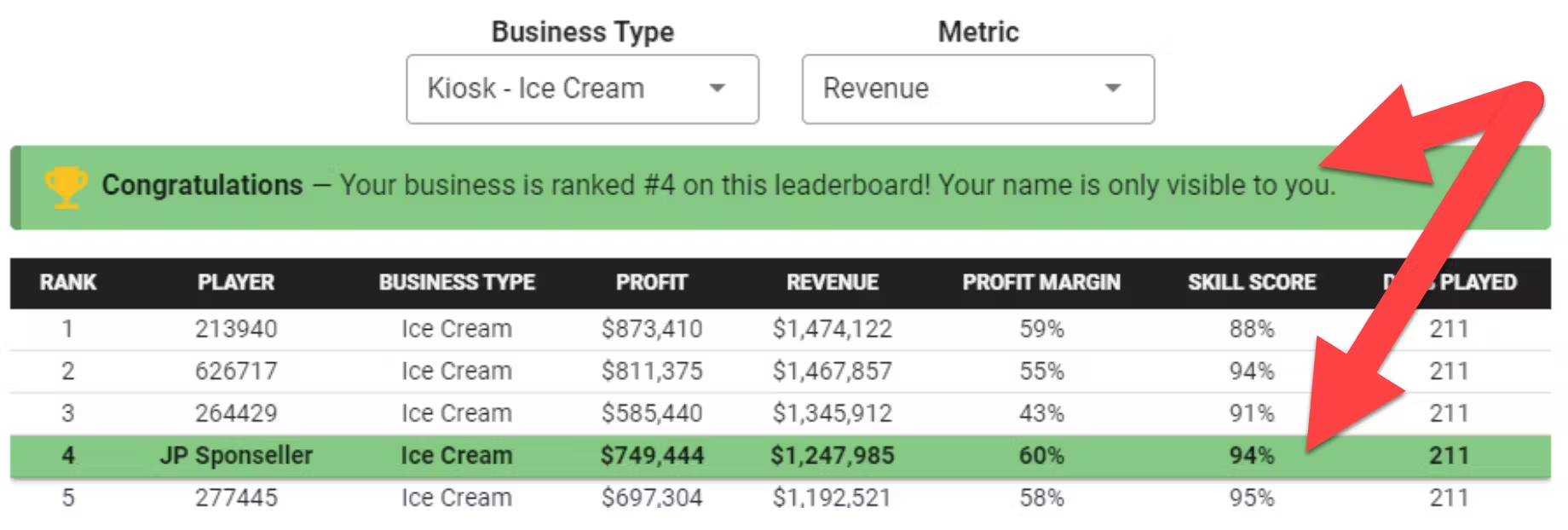
*   Students will see their own names on the Leaderboard when they are logged in to GoVenture, like this …

<img src = "https://books.playgoventure.com/u/3252bcc10b51ebb1f40614a0e1e882b4a5392f09b80f5dcee3ecafd31416cd87dc9ca673878927f6a8c845978e0beb00301c6722e17c66c185b5976cfcdacab05da175988dfb6e03e99e5e0fa4e49e0b518e121e8cf16bcb5fdb3fa74df1cb33afa5c976-S3SU4o.avif" style="width: 75%; display: block; margin: auto;">
    
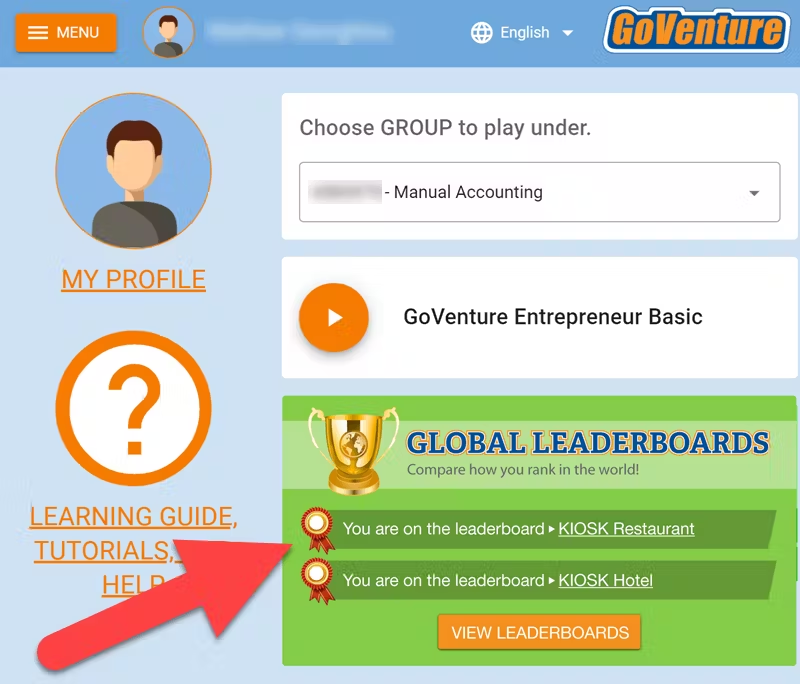
*   Students will be notified that they appear on the Leaderboards on their student dashboard, like this ...

<img src = "https://books.playgoventure.com/u/903970733a8016d7f83ba244761667d80f16c4dedd91d12060d88556ddb9f6572af1a5875f2dcfc122ca489b9d1b290fd5fbd792bcf11108a02e68c957d48ebad1bc842b4452c11ef00a4d49a0ba59a4a7841df0b20cf3a54f79c247593911ec5424c780-UvuJfl.avif" style="width: 75%; display: block; margin: auto;">
    

_New feature coming in the future_— Instructors can see their own students who are on the Leaderboards by viewing the student Performance Reports.

*   Leaderboard rankings are available for Profit, Revenue, Profit Margin, Skill Score, and Days Played.
    
*   Leaderboards are updated once per day at the time shown on the leaderboards.
    
*   Players can only appear once for the same business type and must play at least 60 Simulation Days.
    
*   A high score can only remain on the Leaderboard for up to 6 months. This assures that there will always be new opportunities to appear on the Leaderboards.
    
*   Results from _Entrepreneur Basic_ and _Advanced_ are included and intermingled.
    
*   View and share the Leaderboards with this link    
— <a href="https://playgoventure.com/leaderboards/entrepreneur" target="_blank"><u>playgoventure.com/leaderboards/entrepreneur</u></a>

<hr style="margin: 0;">
### Group Leaderboard

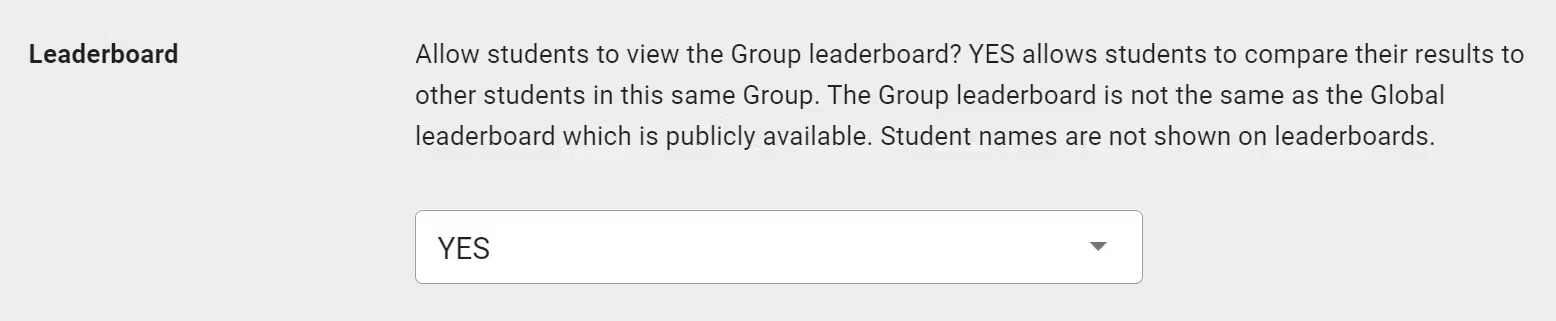
*   In Group Settings, instructors can choose to make Group results visible to students. This allows students to compare their performance against each other.

<img src = "https://books.playgoventure.com/u/a114b67d09ff737e9ab51f5a5ab5372ea6c9010fa1a4370e57e346350d026e8b2bd72e3adfbec0c3e75301d5427b74c15a3f683b9ab488a331fdef17937e27066a3fc19df7c988b8b7c325750e150268d5b9cb61b621314970e04e5bae1f7f516ead14a4-OiN0iz.avif" style="width: 90%; display: block; margin: auto;">
    
*   To maintain student privacy, names are not shown on the Leaderboard — but be aware that since the leaderboard is for a specific group of students, it is likely that students may share or discover who they each are.
    
*   Students can view their Group Leaderboard by choosing their Group Number in the Group dropdown (shown below) on the Global Leaderboard website.  Note that Group Numbers only appear in the Group dropdown if the instructor chooses this option in Group Settings (as shown above).


<img src = "https://books.playgoventure.com/u/f5c566fa2e1237fe101b90a882e236d2757939174b435e45ce6dc4bb992df52d07e3addd1ae0357bf5af51625b786f6be8ee0afe2fa61af380c0f7319e4e6914f423f42964e01db1217f624dd9fb58b3a0cd6fb0a44095f0ca507b43d84badda0e11873a-LHkV1Q.avif" style="width: 90%; display: block; margin: auto;">

<hr style="margin: 0;">