---
title: "10. Curriculum Planning Guide"
url: "https://books.playgoventure.com/2/gvenig/26/10-curriculum-planning-guide"
---

# 10. Curriculum Planning Guide
<hr style="margin: 0;">
This **Curriculum Guide** helps instructors with the **scope and sequence** of course planning for **GoVenture Entrepreneur**.  GoVenture can be used as a **supplement** to enhance an existing curriculum for 2, 5, 10, or 20 hours, or it can be used as the **core curriculum** for a course that requires 40 hours or more. 

<img src = "https://books.playgoventure.com/u/d2149cec77e2e59dab5e4b406bdea124cebbb2a02b8b1070ef7b0fb57f384bc1d39955990192d9ef047038d154244c4de53787f6352d92a1bcbc0f1a3bddac49cc74564d924aaa0695368f1b09da293627556f42b4df9b3276ddbc20cbbb7d092e272086-dhbsrf.avif" style="width: 50%; display: block; margin: auto;">

<hr style="margin: 0;">
## 10.1 Curriculum Time

* The primary decision an instructor must make is to determine **how much time** is available for GoVenture.  This includes curriculum and homework time.

* GoVenture is comprehensive and modular and can be configured to match your available time and the learning outcomes to be achieved. GoVenture covers all or nearly all educational standards for business and entrepreneurship. 
    
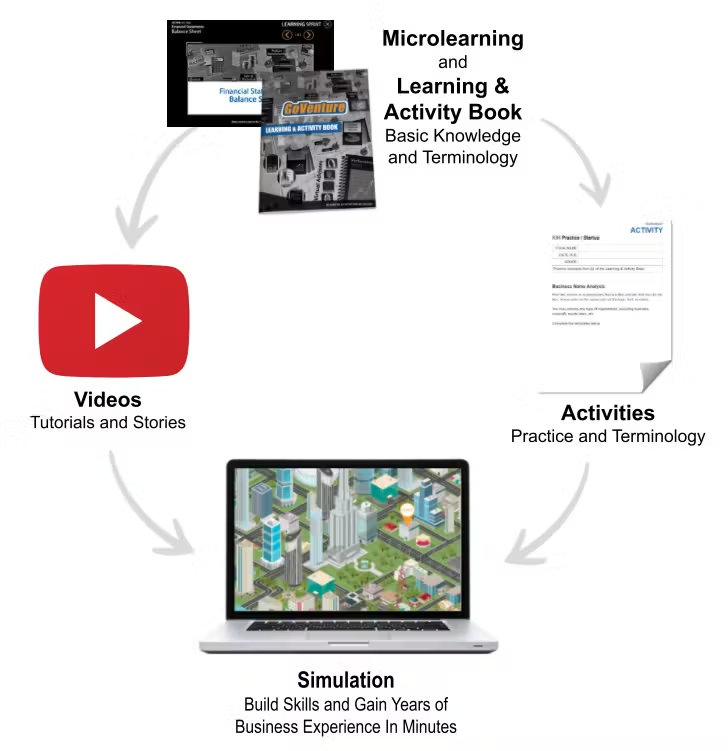
 *  Instructors that will use GoVenture as the **primary resource** for a full curriculum will likely use all the available resources, particularly the comprehensive Microlearning modules and related PDF Activities.
 <br>   
 * Instructors that only have a **few hours** of curriculum time for GoVenture, may focus primarily on the Simulation.
 <br>   

<hr style="margin: 0;">
## 10.2 Possible Approaches

* GoVenture is a comprehensive program designed to supplement and enhance your existing course, program, or curriculum.  It has been specifically created to provide you with a broad and flexible range of options. You may choose to use GoVenture at the **beginning** of a course, at the **end** of a course, or **throughout** an entire course.

<hr style="margin: 0;">
### 10.2.1 Using GoVenture at the Beginning of a Course

* By using GoVenture at the beginning of a course, students immediately gain practical experience in the decisions that need to be made when running a business. This experience provides them with considerably more insight into what they need to learn and why, making them more likely to participate in class discussion and to ask insightful questions.  Lectures and textbooks become instantly transformed into valued sources of information when connected to the realistic GoVenture experience.

<hr style="margin: 0;">
### 10.2.2 Using GoVenture at the End of a Course

* By using GoVenture at the end of a course, students can apply the knowledge, lessons, and techniques they have learned throughout your course to a highly realistic, simulated business setting.  GoVenture provides students with the opportunity to gain experience and to make the important connection between business theory and practice.

<hr style="margin: 0;">
### 10.2.3 Using GoVenture Throughout a Course

* GoVenture is essentially a business laboratory where your students can go every week, or every day, to apply the information and concepts you are teaching in class. Throughout your course, students can continually use GoVenture to experience and experiment with the knowledge they are gaining. Choosing what is right for you depends upon the amount of time you have available to include GoVenture in your curriculum, and your desire to use the many GoVenture resources that are available.
<br><br>

<hr style="margin: 0;">

## 10.3 Scope and Sequence
    
**Determine the number of hours you would like to use GoVenture resources in your curriculum and review the suggested activities in the table below.**

_DAYS = Simulation Days not calendar days_<br>
_Times (hours) are estimates that may vary in practice_

**Recommendation for Entrepreneur BASIC**
 ![ENB Instructor Guide Scope and Sequence 2026-03-04_18-29-10.png](https://books.playgoventure.com/u/enb-instructor-guide-scope-and-sequence-2026-03-04_18-29-10-yHMTXP.png) 

**Recommendation for Entrepreneur ADVANCED**
 ![ENA Instructor Guide Scope and Sequence 2026-03-04_18-29-10.png](https://books.playgoventure.com/u/ena-instructor-guide-scope-and-sequence-2026-03-04_18-29-10-zClvTx.png) 

**Recommendation for ACCOUNTING Training**
- Follow the scope and sequence in the tables above (all use Automatic Accounting), but also include **Kiosk** with **Manual Accounting** for 30 Days (3 hours) in between the Kiosk Practice and the next Kiosk with automatic accounting.

**Additional Resources & Activities**

<table style="border-collapse: collapse; width: 100%; border: 1px solid black;">
  <tr>
    <th style="border: 1px solid black; padding: 10px; text-align: center; background-color: #f2f2f2;">Resources</th>
    <th style="border: 1px solid black; padding: 10px; text-align: center; background-color: #f2f2f2;">Details</th>
  </tr>
  <tr>
    <td style="text-align: center; font-weight: bold; border: 1px solid black; padding: 10px;">Microlearning</td>
    <td style="border: 1px solid black; padding: 10px;">Provides 5-7 hours of learning based on the number of topics you choose.</td>
  </tr>
  <tr>
    <td style="text-align: center; font-weight: bold; border: 1px solid black; padding: 10px;">Videos</td>
    <td style="border: 1px solid black; padding: 10px;">Provides many hours of learning based on the number of videos you choose.</td>
  </tr>
  <tr>
    <td style="text-align: center; font-weight: bold; border: 1px solid black; padding: 10px;">Lessons & Activities</td>
    <td style="border: 1px solid black; padding: 10px;">Over 50 activities provide 30 hours of learning based on the number of activities you choose. Most activities require 20 - 40 minutes to complete.</td>
  </tr>
  <tr>
    <td style="text-align: center; font-weight: bold; border: 1px solid black; padding: 10px;">Business Learning & Activity Book</td>
    <td style="border: 1px solid black; padding: 10px;">Over 200 pages provide 5 to 10 hours of reading and activities. The same content in this book is presented as videos and quizzes in the Microlearning modules.</td>
  </tr>
  <tr>
    <td style="text-align: center; font-weight: bold; border: 1px solid black; padding: 10px;">Debriefs</td>
    <td style="border: 1px solid black; padding: 10px;">Host live debrief discussions to review student performance and allow students to share their observations and best practices with their classmates.</td>
</td>
  </tr>
<tr>
    <td style="text-align: center; font-weight: bold; border: 1px solid black; padding: 10px;">How Students Can Use AI With GoVenture Simulations</td>
    <td style="border: 1px solid black; padding: 10px;"><a href="https://books.playgoventure.com/15/aiactivity" target="_blank">View Activity</a></td>
</td>
  </tr>
</table>

**Notes**
  
*   This guide is provided as a helpful resource — instructors may choose to use any resources in any sequence desired to best match their instructional objectives. Time allocated to each activity can be expanded using the many resources provided.
    
*   GoVenture Entrepreneur includes three levels of businesses with increasing complexity — _Lemonade Stand_, _Kiosk Business_, and _Full Business_. Everyone should progress in the exact order shown, but instructors may choose to stop at a particular level based on the profile of their students and the time available.
   
*   Play time varies but here is how long it typically takes to play **30 Simulation Days**:
 * Lemonade Stand — 1 Hour
 * Kiosk Business — 1.5 Hours
 * Full Business — 2 Hours

* The first few Simulation Days are played much slower as students do the tutorial walkthrough and set up their businesses.

<hr style="margin: 0;">
