---
title: "1. Start Here"
url: "https://books.playgoventure.com/5/gvceoig/72/1-start-here"
---
# 👉1. Start Here
## 1.1 Create Your Instructor Account
- Create your Instructor Account by going to GoVentureCEO.com and follow the links to CREATE ACCOUNT — you only need to do this once. Going forward you may log in at any time with your username and password.
## 1.2 How To Get Started
- Get started quickly by watching this 10-minute video by the founder & CEO of MediaSpark and designer of GoVenture CEO.
## 1.3 Five-Step Summary
You can do this yourself or book an onboarding meeting with a _GoVenture Learning Advisor_. We will identify the best setup for your curriculum and create a customized Course Plan — there is no cost.
Follow these steps to get started:
1. Become familiar with **GoVenture CEO** as a student and instructor
2. Determine the **number of hours** of student play and your **Assessment** methodology
3. **Create** your Simulations — or ask us to help by scheduling a **Personal Onboarding Webinar**
4. **Onboard** students with our ready-to-use resources described further in this document.
5. As students play the simulation, consider if and when you want to provide **facilitation** along the way.
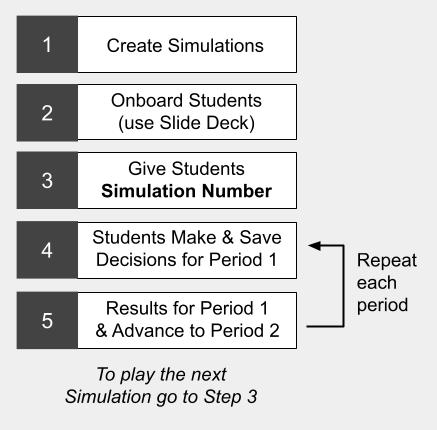
## 1.4 Gameplay Process
## 1.5 Subscription Keys & Simulation Numbers
- A **Subscription Key** is a 32-digit number that allows instructors and students to create a personal account on the GoVenture system. Your students may or may not need Subscription Keys, depending on the type of instructor account that you have.
- A **Simulation Number** is one or more numbers generated by GoVenture when you create a Simulation Competition. The Simulation Number enables players to join the specific Simulation Competition that you are managing.