---
title: "6. Student Accounts & Onboarding"
url: "https://books.playgoventure.com/5/gvceoig/77/6-student-accounts-onboarding"
---
# 6. Student Accounts
## 6.1 Student Accounts
Identify the type of account that applies to you and review the details below. Your type is displayed on your Instructor Dashboard as shown below.
* **Learner Managed** — College, Nonprofit, Business
-or-
* **Instructor Managed** — Primarily for K-12 Schools
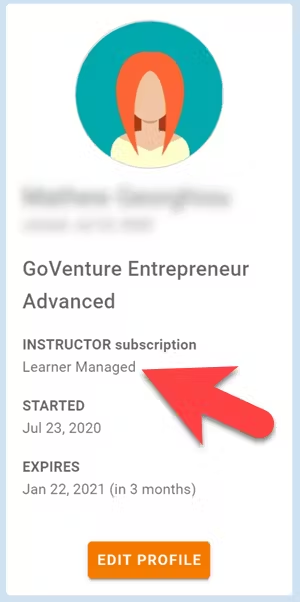
### 6.1.1 _Learner Managed_ — primarily for colleges, universities, nonprofits, and businesses
* Students create and manage their own personal login accounts.
* Students create accounts with a **Subscription Key** — a 32 digit number that looks like this: 12345678-12345678-12345678-12345678.
* Students can purchase their own Subscription Keys or organizations can purchase them for students using any combination of these three options:
* Purchase keys individually or in bulk using a credit card or PayPal at BuyGoVenture.com
* Buy with a Purchase Order using our Order Form at GoVenture.net/prices
* Sell through a bookstore — review the information at
GoVenture.net/bookstore
* Give students the **Simulation Number** number you want them to play and your **student roster** will build automatically as students join your Simulation Competition. You do not have to input student names, emails, or any other information — it's all automated.
* For helpful instructions and resources, see section _7 Onboarding Students_.
### 6.1.2 _Instructor Managed_ — primarily for K-12 schools
* Instructor Managed subscriptions do not require students to create full accounts on GoVenture. Students do not have to disclose personally-identifiable information.
* Instructors do not need to input a student roster. This will be done automatically by GoVenture.
* Students will be prompted to enter a Simulation Number and their name (or student ID or other pseudonym) and password. When you create a new Simulation Competition, you will be given a unique Simulation Number to distribute to each student. Each Simulation Number will be similar but with a few digits added to the end (such as -01, -02, -03, etc).
* If a student forgets their personal Simulation Number, you can retrieve it from ALL REPORTS > BUSINESSES.
* If a student forgets their password, you can reset it using the RESET PASSWORD feature in the ACTIONS tile.
* **Important** — The website students go to is _**not**_ the same as the instructor. The correct website for students is **GoVentureCEO.com/play** and is listed in DIRECTIONS FOR PLAYERS in the ACTIONS tile.