---
title: "6. Curriculum Planning Guide"
url: "https://books.playgoventure.com/7/gvlmig/88/6-curriculum-planning-guide"
---
# 6. Curriculum Planning Guide
## 6.1 Time Available
* Instructors should first consider how much curriculum time is available and which learning outcomes need to be achieved. GoVenture covers all or nearly all educational standards for personal financial literacy. Satisfying hundreds of standards can take dozens of hours of time.
* Instructors that plan to use GoVenture as the primary resource for a full curriculum will likely use all the available resources, particularly the comprehensive _Learning Guide_ and related _PDF Activities_.
* Instructors who only have a few hours of curriculum time for GoVenture may focus primarily on the _eWorkbook_, _Online Activities_, and the _Life & Money Simulation_.
* All resources can be used independently of each other.
## 6.2 Time Required
The hours listed below can be completed over multiple session in class or at home.
**Your Story Simulation** — 1.5 to 2 hours
**eWorkbook** — 2 to 5 hours
**Online Activities** x10 — 15 to 60 minutes each
**PDF Activities** x70 — 15 to 60 minutes each
**Videos** — depends on which ones are assigned
**Develop Language Skills** — View Document PDF
**Investing Simulation** — 1 to 10 hours depends on the number of simulation years to be played and instructor pacing. This activity can be repeated multipled times.
**Life & Money Simulation** — 5 to 15 hours depending on the number of simulation years to be played and instructor pacing. This activity can be repeated multipled times.
* Students can take as much time as they want to make decisions in the _Life & Money Simulation_ and the _Investing Simulation_. There is no clock or time limit, except that the Simulation can be played for up to 20 simulation years. The number of years is set by the instructor.
* The Simulation advances by weeks (not days) and each year has 48 weeks (not 52).
* How quickly a student will progress through the Simulation will depend on how thoughtful their decisions are and the instructor’s requirement for progress, including Goals to be achieved. For example, the instructor may tell students that they must progress through 1 simulation year within the next 30 minutes, thereby providing students an average of 30 seconds to make their decisions each simulation week.
* The walkthrough tutorial available when a new simulation is first started takes an estimated 30 minutes to complete. This simulation is required for all new students, but if a student has previously completed the tutorial in another Group, the student will have the option of skipping the tutorial.
* The first year of a new simulation may require 30 to 45 minutes to complete (not including the walkthrough tutorial). Each subsequent year will average 30 minutes to complete. Students should be provided between 20 seconds to 1 minute of decision time for each simulation week, plus any additional time needed to periodically evaluate reports in more depth. For a full 20 years of play, the time required can range from 5 to 15 hours, depending on the simulation settings and student pace.
## 6.3 Teaching Students the Fundamentals
* The _Life & Money Simulation_ allows students to practice personal finance but does not explicitly teach fundamental concepts and terminology. Instructors should teach the fundamentals before students play the Simulation or can have students play the _Your Story Simulation_ and the _eWorkbook_. These resources are specifically designed to teach the fundamentals with no preparation or prior knowledge required.
* Video Tutorials are available for students to better understand all the resources they will play.
* When students first play the _Life & Money Simulation_, an in-game tutorial will appear that will walk them through the main components of the Simulation interface and gameplay.
* The _Life & Money Simulation_ includes a LEARN button at the bottom of the interface which links directly to section 23 of the _Learning Guide_ for additional guidance.
* The _Learning Guide_ provides comprehensive coverage to support a full curriculum.
* _Online and PDF Activities_ can be used for practice and grading.
## 6.4 Resource Selection
This detailed video will help you understand how all of the GoVenture resources should best be used so that you can be efficient in your learning strategy. This video is for both teachers and students.
## 6.5 Scope & Sequence
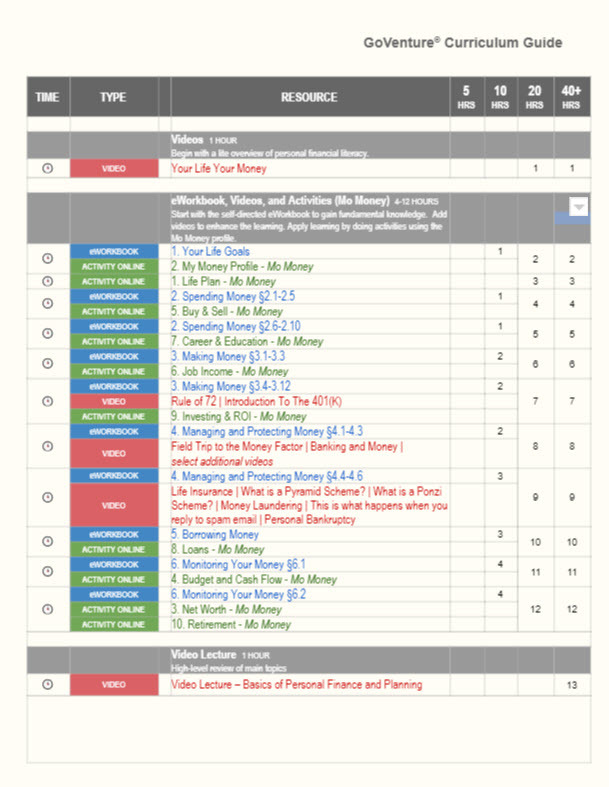 Detailed Scope & Planning options are described in the
Curriculum Guide PDF
Detailed Scope & Planning options are described in the
Curriculum Guide PDF